
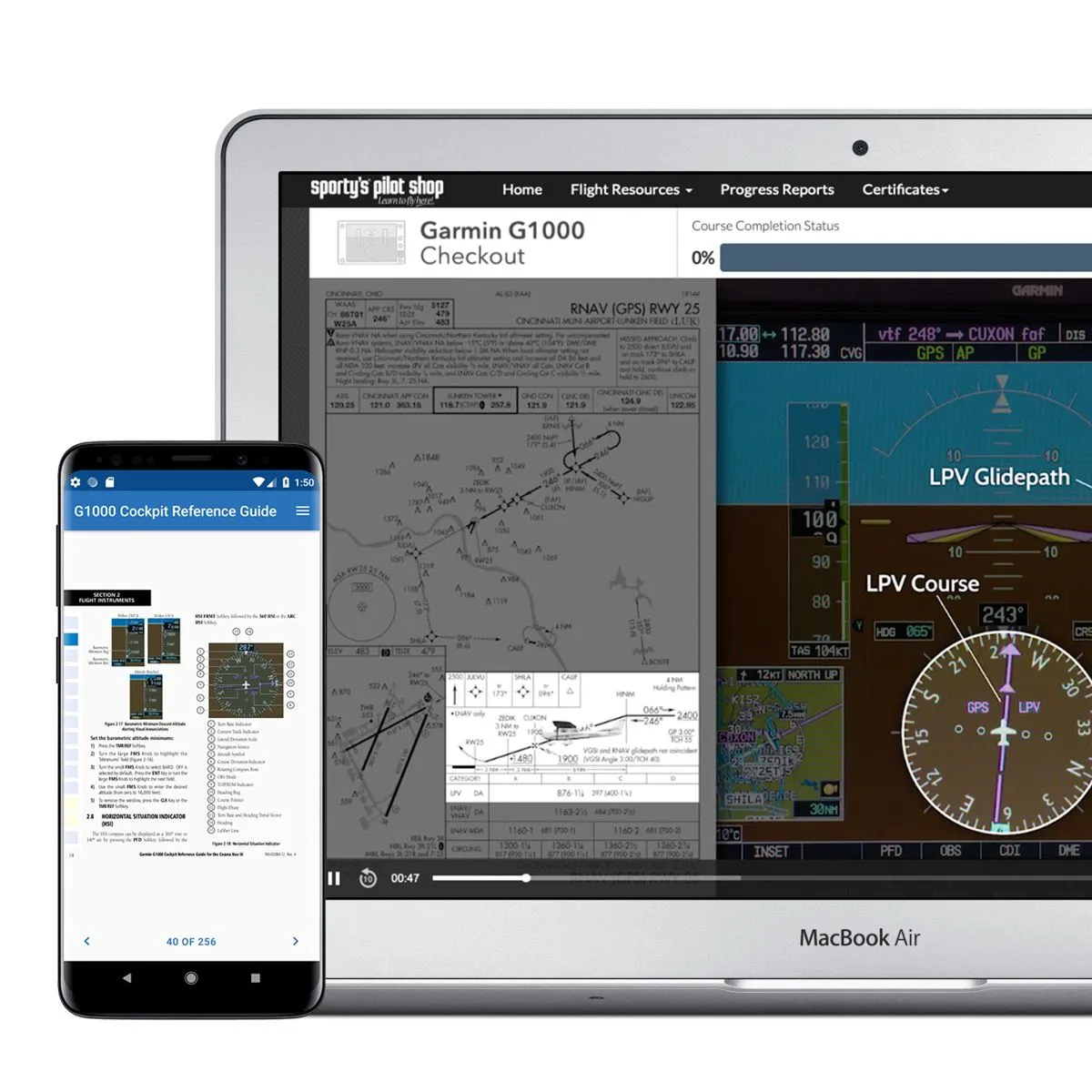

sign up as a Skyfarer user for 10% off at checkout
What is the Garmin G1000 — and why does it require dedicated training?
The Garmin G1000 integrated avionics suite is the most widely installed glass cockpit system in general aviation, found in Cessna 172s, 182s, 206s, Piper Archers, Cirrus SR20s and hundreds of other training and personal aircraft. It combines a Primary Flight Display (PFD), a Multi-Function Display (MFD), an integrated GPS/NAV/COM system, engine monitoring, traffic awareness, terrain awareness and datalink weather into a single integrated cockpit.
The problem is that the G1000 is genuinely complex. Pilots transitioning from traditional “steam gauge” aircraft often find the sheer volume of information on the G1000 screens overwhelming — and worse, they may rely on the automation without fully understanding it, leading to dangerous situations. The FAA has documented numerous accidents where pilots flying G1000-equipped aircraft lost situational awareness precisely because they didn’t understand the system they were using. A proper G1000 checkout course is not a luxury — it’s a safety necessity.
Why Sporty’s stands apart for G1000 training
Here’s what makes Sporty’s G1000 Checkout Course uniquely credible: it is filmed in actual G1000-equipped aircraft operated by Sporty’s Academy — including G1000-equipped Cessna 172 Skyhawks and 182 Skylanes at Clermont County Airport (I69). You’re not watching someone click through a desktop simulator or screen-record a PC-based G1000 emulator. You see the actual hardware, in an actual aircraft, operated by experienced Sporty’s instructors who teach G1000 operations to real students every day.
This matters because the G1000 behaves differently on the ground in a classroom versus in a moving aircraft. Button feel, scan patterns, workload management — these are things you can only learn from watching real pilots manage a real G1000 in real flight. Sporty’s delivers this and nothing else in the online training space does.

What’s covered in the G1000 Checkout Course?
| G1000 orientation | PFD, MFD, GCU 476 controller layout — softkeys, function keys, knob logic, menu navigation |
| PFD flight instruments | Attitude indicator, airspeed tape, altitude tape, VSI, heading indicator, HSI |
| GPS navigation | FPL page, Direct-To function, airways entry, procedure loading (departures, arrivals, approaches) |
| COM/NAV radios | Integrated radio management, standby frequencies, audio panel, squelch, intercom |
| Engine monitoring | EIS page — CHT, EGT, oil temp/pressure, fuel quantity, electrical system monitoring |
| Weather datalink | XM Weather overlays, METAR stations, TFRs, lightning strikes, AIRMETs on MFD |
| Traffic awareness | TIS traffic — symbols, altitude readouts, bearing/range, threat assessment |
| TERRAIN awareness | TAWS alerts, terrain overlay, obstacle awareness, VSR (Vertical Speed Required) warnings |
| GFC 700 autopilot | AP modes (HDG, NAV, APR, VS, FLC, ALT), flight director, coupled approaches |
| IFR approaches on G1000 | Loading and flying ILS, RNAV/GPS and VOR approaches — full procedure from filing to missed |
| Failure modes | Partial panel on G1000, reversionary mode activation, red X failures, backup instruments |
| G1000 NXi | Differences between the original G1000 and the updated NXi software platform |

What pilots say about Sporty’s G1000 Checkout Course
The transition from steam gauges to glass cockpits can be intimidating, but with proper training it can open up a whole new world of advanced avionics. Let Sporty’s save you time and money in your transition training.
— Sporty’s course description
I spent two days clicking around a PC-based G1000 emulator and was still lost. One afternoon with the Sporty’s course in an actual aircraft cockpit setting and everything clicked. The filmed-in-aircraft approach is the right one.
— Private pilot transitioning to G1000 aircraft ⭐⭐⭐⭐⭐
The GFC 700 autopilot section alone is worth the price. Most pilots who fly the G1000 don’t fully understand the autopilot modes. This course fixes that comprehensively.
— Instrument pilot, G1000 aircraft owner ⭐⭐⭐⭐⭐
✈️ Skyfarer Exclusive — Save 10%
Sign up as a Skyfarer user to unlock your discount at checkout
Enrol in Sporty’s G1000 Checkout Course — 10% off →
Click our link, add to cart, sign up as a Skyfarer user to unlock your discount at checkout. Lifetime access included.
Frequently asked questions — G1000 Checkout Course
Does this course work for the G1000 NXi as well as the original G1000?
Yes — Sporty’s G1000 Checkout Course covers both the original G1000 and the updated G1000 NXi software platform. The NXi has a more modern interface with clearer graphics, updated map data and some revised menu structures, but the fundamental operating philosophy is the same. The course identifies where the NXi differs from the original, so you’ll know what to expect regardless of which variant you’re flying.
I’m renting a G1000 C172 at my local FBO — is this course enough to fly it safely?
Sporty’s G1000 course is an excellent companion to in-aircraft training — it’s designed to significantly reduce the hours you need in the aircraft by giving you a deep understanding of the system before you ever sit in the left seat. Most FBOs require a checkout flight with one of their CFIs before renting G1000 aircraft; completing Sporty’s course beforehand will make that checkout faster, cheaper and more productive. Sporty’s explicitly describes the course as “the perfect complement to in-aircraft training with your instructor.”
What is the GFC 700 autopilot and is it covered in detail?
The GFC 700 is Garmin’s digital autopilot system integrated with the G1000, found in G1000-equipped Cessna 172s and 182s among others. It provides heading select (HDG), navigation tracking (NAV), altitude hold (ALT), vertical speed (VS), flight level change (FLC) and approach coupling (APR) modes, plus a flight director. The GFC 700 section in Sporty’s course covers every mode in detail — including how to fly coupled ILS and GPS approaches, how to manage go-arounds with the autopilot engaged, and what to do when the autopilot disconnects unexpectedly.
What happens if the G1000 fails in flight — does the course cover this?
Yes — the G1000 failure and reversionary mode section is one of the most important parts of the course. When a G1000 display fails, the remaining display automatically enters reversionary mode, combining PFD and MFD functions on one screen. The course shows you what this looks like, how to activate reversionary mode manually, and what information you have available versus what you’ve lost. The backup standby instruments (typically a magnetic compass, standby airspeed, and standby altimeter) are also covered in the context of managing G1000 failures.
sign up as a Skyfarer user for 10% off at checkout
Affiliate disclosure: Skyfarer earns a commission from qualifying purchases. Skyfarer members save 10%.
You must be logged in to post a comment.