

Every pilot trains for engine failures. But when one actually happens — over unfamiliar terrain, at night, or far from an airport — the decision of where to land can be overwhelming. ForeFlight’s new Emergency Glide Mode is designed to take the guesswork out of that critical moment.
What Emergency Glide Mode Does
Jeppesen ForeFlight released Emergency Glide Mode (EGM) as part of its version 18.3 update in April 2026. The feature builds on ForeFlight’s existing Glide Advisor, which shows a cyan ring on the map representing your aircraft’s estimated glide range based on altitude and winds.
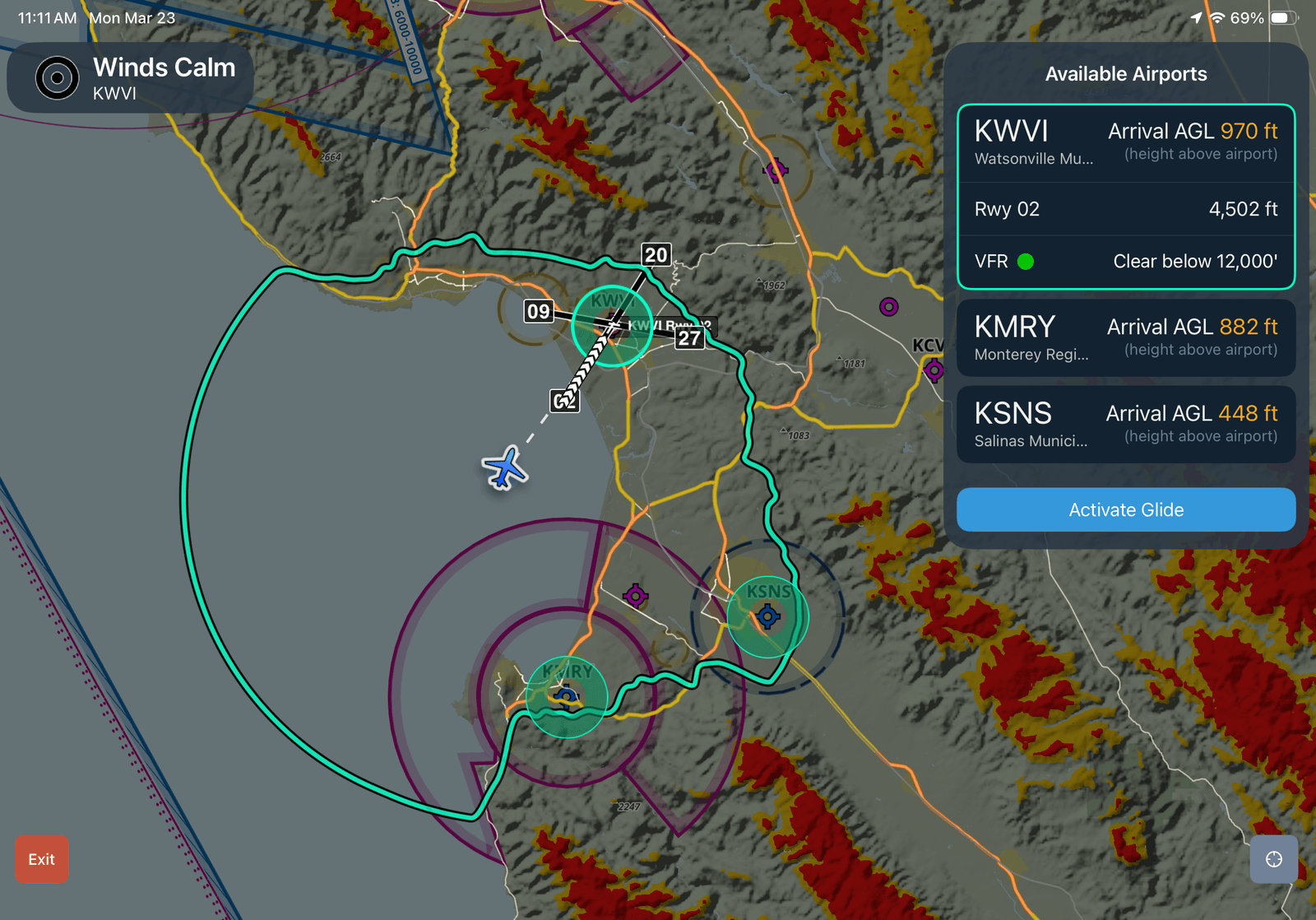
EGM goes much further. When activated with a single tap, it strips the map down to what matters most: landing options. The screen clears away non-essential information and shows a focused view of nearby airports ranked by distance, runway length, surface winds, weather, and your estimated altitude on arrival.
If you pick an airport, the app draws a direct route, highlights the best runway based on wind, and displays your estimated time to arrival and projected altitude above the field. It also pulls up relevant frequencies and current weather.
The feature is available globally at all ForeFlight plan levels.
When No Airport Is in Reach
Here is where EGM stands out from earlier glide tools. If no airport falls within your glide range, the mode switches to showing possible off-airport landing areas.
ForeFlight built this layer using U.S. Geological Survey data and a proprietary algorithm. The app scans the terrain below and highlights potential landing sites in shades of green on the map. It also overlays roads and power lines to help pilots orient quickly.
Each candidate site must meet a minimum length of 1,000 feet. The algorithm evaluates five main factors: surface type (grass, pavement, dirt), terrain slope, distance from obstacles, nearby hazards like power lines, and tree canopy density.
This off-airport layer is currently available only in the lower 48 U.S. states.
Why This Matters for Pilots
Engine failures in single-engine airplanes are rare — but they do happen. When they do, pilots have seconds to shift from normal flying to emergency decision-making. The workload spikes fast. You’re simultaneously managing aircraft control, running checklists, talking to ATC, and scanning for a place to land.
EGM is designed to reduce that cognitive load. Instead of mentally estimating glide range and scanning sectional charts, the pilot gets an instant, prioritized list of options.
The tool also auto-configures best glide speed and ratio for many common aircraft types. Pilots can customize these settings for their specific airplane. When activated, it turns on situational awareness features like the instrument panel, extended runway centerlines, and a track vector — all tools that help a pilot fly a stabilized approach to a landing site.
How It Compares to Other EFB Tools
Garmin Pilot has offered a similar emergency mode for several years. It includes glide range rings, a nearest-airport function, and instant access to emergency checklists. For pilots already flying with Garmin avionics, it integrates directly with the panel.
ForeFlight’s version adds a notable differentiator: the off-airport landing site analysis. Garmin’s mode points you toward airports. ForeFlight’s goes a step further by evaluating terrain when no airport is reachable. For pilots flying over remote or wooded areas, that feature could make a real difference.
As one AVweb commenter noted, the off-airport analysis is “massive at night in wooded areas or IFR/low visibility to get guidance where you at least have a chance of not ending up in the trees.”
What Pilots Should Keep in Mind
EGM is a decision-support tool — not a replacement for good training. The landing areas it highlights are algorithmically identified “best bets,” not verified surfaces. A green patch on a screen could still have hidden obstacles, soft ground, or other hazards that satellite data cannot detect.
Pilots should also set up the feature before they need it. EGM requires Glide Advisor to be enabled in map settings with your aircraft’s best glide speed and ratio entered. You can configure these per aircraft profile. Taking two minutes on the ground to set it up means it is ready when it matters most.
ForeFlight’s product manager, Cole Crawford, put it plainly in the company’s announcement: the goal is to help a pilot who has lost all engine power “get your eyes outside faster.” In an emergency, looking out the window — not at a screen — is still what saves lives. But having the right information before you look up can make all the difference.



You must be logged in to post a comment.