
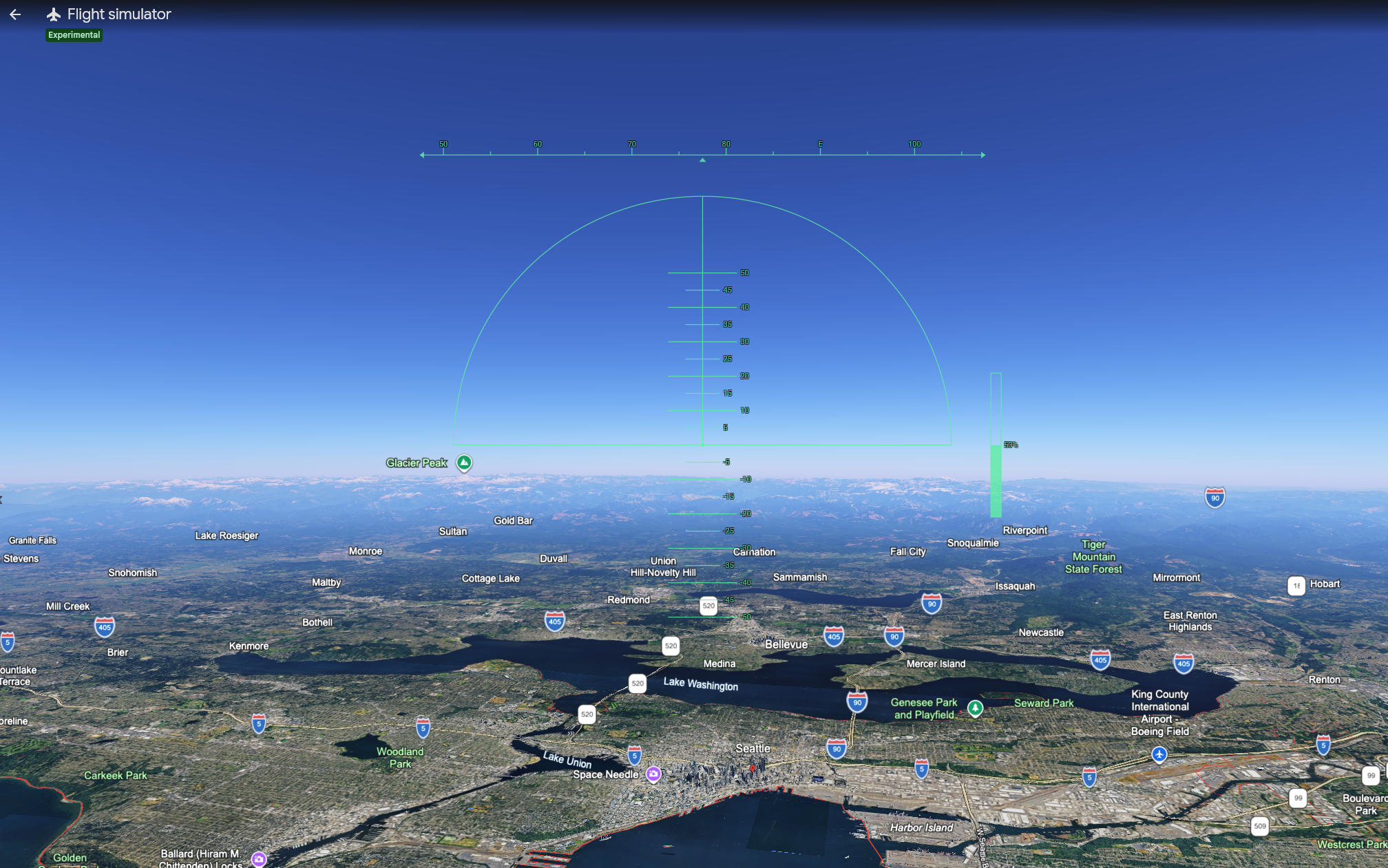
Google has quietly added a free Flight Simulator mode to the web version of Google Earth, making a feature that was previously buried in the desktop application accessible to anyone with a browser. The launch was added to Google’s documentation over the weekend of June 13-14, 2026, and lets users fly over real satellite imagery and 3D terrain from anywhere on the planet — no install required.
It’s not a replacement for Microsoft Flight Simulator or X-Plane. But for casual exploration, geography learning, and a surprisingly useful look at airports and terrain before a real flight, it’s worth knowing about.
What Is Google Earth Flight Simulator?
Google Earth Flight Simulator is a built-in flight mode that lets users fly a simulated aircraft over Google’s satellite-mapped world. The feature originally launched in 2007 as a hidden Easter egg in Google Earth Pro, the desktop application, accessible via a keyboard shortcut. It remained a desktop-only feature for nearly two decades.
The new web version, launched in June 2026, brings the same functionality to anyone with a browser at earth.google.com. It uses Google’s satellite imagery, 3D building data, and terrain mapping as the world you fly through. Aircraft choices are limited and the physics are simplified compared to dedicated flight simulators, but the realism of flying over actual recognizable landmarks — your hometown, the Grand Canyon, the runway at JFK — is the appeal.
How to Access Google Earth Flight Simulator on the Web
The web version is the easiest path. Here’s the process:
- Open a browser and go to earth.google.com
- Click Explore Earth to load the main Google Earth interface
- Click the Tools menu in the top toolbar
- Select Flight Simulator from the dropdown
- Choose an aircraft and starting location, then take off
You can also access it through the View menu in some browser configurations. The exact location may shift as Google updates the interface.
What Can You Actually Do With It?
Google Earth Flight Simulator isn’t a serious flight training tool. It’s not a procedure trainer, not an instrument simulator, and not certified for any logged training time. But it does several things genuinely well:
Familiarize yourself with airport layouts. Before flying to an unfamiliar airport, you can launch from the runway and look around. The 3D terrain and building data give a reasonably accurate sense of where the FBO is, what the approach looks like over surrounding terrain, and where to expect taxiway turnoffs.
Visualize mountain flying terrain. For pilots planning a trip through the Sierra Nevada, the Rockies, the Appalachians, or any unfamiliar mountain region, flying the route in Google Earth gives a real sense of the terrain at altitude. It’s not a substitute for proper mountain training, but it builds spatial awareness.
Teach kids and non-pilots about flight. The simulator is genuinely fun and accessible. A 10-year-old can sit in front of it and start flying within five minutes. For young people curious about aviation, it’s an excellent first taste of what flying involves.
Explore the world visually. Flying over the pyramids of Giza, the Grand Canyon, downtown Manhattan, or the Norwegian fjords from a virtual cockpit is a different experience than scrolling around the map. It feels more like travel and less like browsing.
Geography and classroom use. Teachers have used Google Earth Flight Simulator for years to make geography lessons more interactive. The web version makes that significantly easier — no software installation required, just a browser link.
What It Won’t Do
The feature has clear limits worth setting expectations around:
Not a real flight simulator. The flight model is simplified. Stalls, spins, weather effects, and most aircraft systems behave unrealistically. Don’t expect to translate skills from Google Earth into real aircraft handling.
No multiplayer. Single-user only. You can’t fly with a friend or join an online server.
No native night flying. The simulator doesn’t model day/night cycles. You can manually darken your monitor for an approximation, but the simulation environment remains daylight.
Limited aircraft selection. Two aircraft. No tail-draggers, no helicopters, no airliners. If you want variety, you’ll need a dedicated simulator.
Terrain loading limitations. Flying too fast can outpace Google Earth’s ability to stream new satellite imagery. The smoothest experience comes at lower altitudes and slower speeds. The web version particularly benefits from switching to satellite basemap mode for the most realistic visuals.
No ATC or traffic. You fly alone in an empty sky. There’s no air traffic control, no other aircraft, and no airspace structure to navigate.
Should Pilots and Students Bother?
For student pilots and active pilots, Google Earth Flight Simulator isn’t going to replace any portion of your training. The simplified physics, lack of cockpit instruments, and absence of ATC mean it doesn’t develop the specific skills that real flight training builds.
But it has real value as a pre-flight visualization tool. Before a cross-country flight to an unfamiliar airport, spending five minutes flying the approach in Google Earth gives you a visual model of the terrain, the runway environment, and the surrounding landmarks. That’s useful situational awareness that no chart-based briefing can fully provide.
For young people considering aviation, the simulator is one of the easiest, cheapest, and most accessible ways to experience what flying might feel like. Pair it with a Young Eagles flight or a discovery flight at a local flight school, and you have a complete introduction to general aviation.
For everyone else, it’s a free way to fly anywhere in the world from a web browser. Sometimes that’s enough.
Frequently Asked Questions
How do I access Google Earth Flight Simulator? On the web, go to earth.google.com, click Explore Earth, then click the Tools menu and select Flight Simulator. On the desktop Google Earth Pro application, click Tools and select Enter Flight Simulator, or press Ctrl + Alt + A (Windows/Linux) or Cmd + Option + A (Mac). Both methods are free.
Is Google Earth Flight Simulator free? Yes. The Flight Simulator mode is a free built-in feature of both Google Earth on the web and Google Earth Pro on the desktop. There are no subscriptions, in-app purchases, or premium tiers.
What aircraft can I fly in Google Earth? Google Earth Flight Simulator includes two aircraft: the Cirrus SR22 (a single-engine piston aircraft suitable for beginners) and the F-16 Fighting Falcon (a fast military jet recommended for users already comfortable with the SR22). There is no option to switch aircraft during a flight session.
Is Google Earth Flight Simulator a good flight training tool? Not for actual pilot training. The flight physics are simplified, there’s no air traffic control, no cockpit instruments beyond a basic HUD, and the simulation doesn’t replicate real aircraft handling. However, it’s useful for visualizing unfamiliar airport layouts, mountain flying terrain, and basic spatial awareness before real flights.
What are the controls for Google Earth Flight Simulator? Use the arrow keys for pitch and roll, Page Up to increase throttle, Page Down to decrease throttle, G to toggle landing gear, F to toggle flaps, and the space bar for brakes. Joystick input is supported on the desktop version and provides significantly smoother control than keyboard input.
Sources:


