The pre-buy is done, the sale has closed, and the new owner of a 172 M is sorting through a box of paperwork: logbooks, a handbook, a stack of supplements, and a checklist that may or may not still match the airplane.
The 172 M is a mid-1970s Skyhawk that still serves as a trainer and a family airplane. Setting one up for a new owner means going through those documents and making sure the checklist in the cockpit reflects the airplane’s current equipment.
A fresh, model-specific checklist is a simple place to start, and CheckMate Pro can add your tail number and your airplane’s empty weight and useful load.
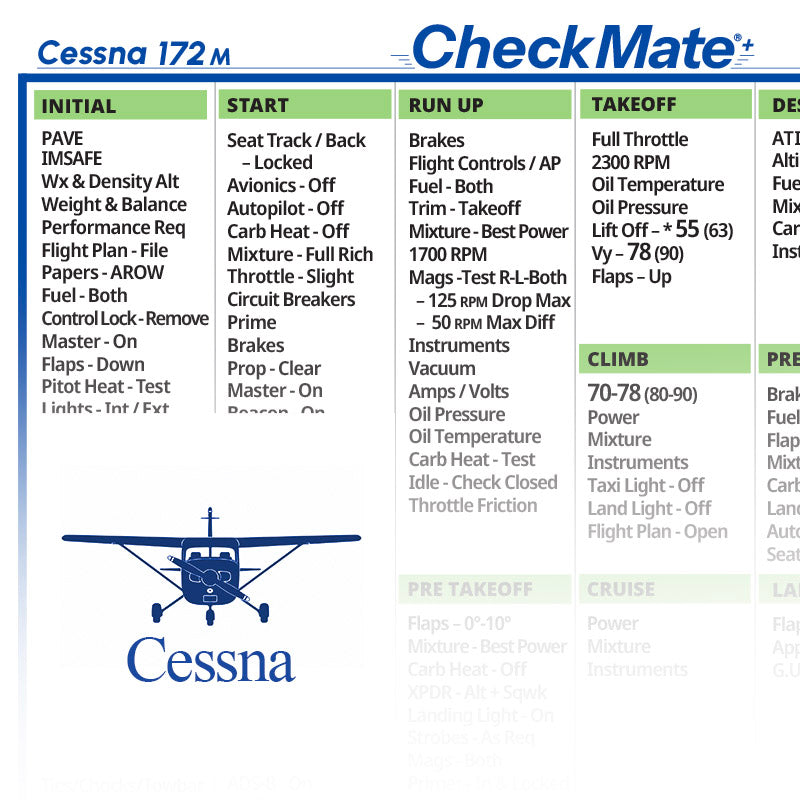
Quick answer: CheckMate Cessna 172 M Checklist is a model-specific cockpit checklist for pilots who fly the Cessna 172 M. It suits new owners, renters and students flying the 172 M. It’s offered as the original CheckMate, CheckMate+, the personalized CheckMate Pro and QuickMate, with the CheckMate versions in Standard and Compact sizes. It supplements, not replaces, the airplane’s POH/AFM, so confirm it matches your aircraft’s exact model, year, engine and handbook before relying on it. It’s available on Skyfarer and at Skyfarer Shop.

Which version to choose
- CheckMate. The design that started it all, with the familiar legacy look, in Standard (6.5″ x 9″) or Compact (5″ x 7″) size.
- CheckMate+. Updated design language for better readability and safety, with passenger and crew briefing prompts, abort plan prompts and ATC communications prompts. It includes an instant low-res, black-and-white temporary digital download, and comes in Standard (6.5″ x 9″) or Compact (5″ x 7″) size.
- CheckMate Pro. A personalized version of CheckMate+. Add your tail number, name or phone number, your empty weight and useful load, and details for up to five airports you visit often. Typical production time is within 48 hours; Standard (6.5″ x 9″) or Compact (5″ x 7″) size.
- QuickMate. A 5″ x 7″ plastic card with an abbreviated checklist for pilots who prefer minimalism. It keeps only the most critical information but retains all the V-speeds and emergency procedures from CheckMate.
Before you fly with it
- Line it up with the POH. Compare every section with the POH/AFM, emergency procedures included, and treat the handbook as the authority wherever they differ.
- Confirm the exact airplane. Make sure the checklist matches your aircraft’s model, year and engine, plus any supplements for installed avionics or modifications.
- Match it to your equipment list. Go through the current equipment list and supplements, and note anything installed that the checklist doesn’t cover.
- Use it every flight. Run it the same way on every flight, short local hops included, so it’s a habit rather than a formality.
Pilot tip: After buying an airplane, spend an hour in the cockpit on the ground with the checklist, finding every switch and control it names. It’s the cheapest familiarization flight you’ll ever make.
More photos


Where to buy
CheckMate Cessna 172 M Checklist is sold by Skyfarer Shop. Find it on the Skyfarer marketplace or order directly from Skyfarer Shop. Either link shows the current price, shipping options and return terms.
Frequently asked questions
Should I get the Standard or Compact size?
Standard is 6.5″ x 9″; Compact is 5″ x 7″. Pick the size that fits your kneeboard and that you can read easily in the cockpit.
How do I know it matches my airplane?
Compare it with your aircraft’s POH/AFM and supplements, and confirm the model, year and engine. The handbook for your specific airplane takes priority over any checklist.
What is QuickMate?
A 5″ x 7″ plastic card with an abbreviated checklist for pilots who prefer minimalism. It keeps all the V-speeds and emergency procedures from CheckMate.