A jump pilot can fly many loads in a single day: climb, drop, descend, land, refuel, repeat. Cessna 206s are a familiar sight at drop zones, and the work is repetitive enough that the checklist becomes the main defense against complacency.
On the tenth load of the day, it’s easy to run the before-takeoff check from memory and skip the item that changed since the last load. Keeping a 206 F checklist within reach, and actually reading it every cycle, is a simple habit that holds up. Treat it as a supplement to the airplane’s POH/AFM and any supplements that apply to its configuration, and confirm it matches your airplane before it goes to work.
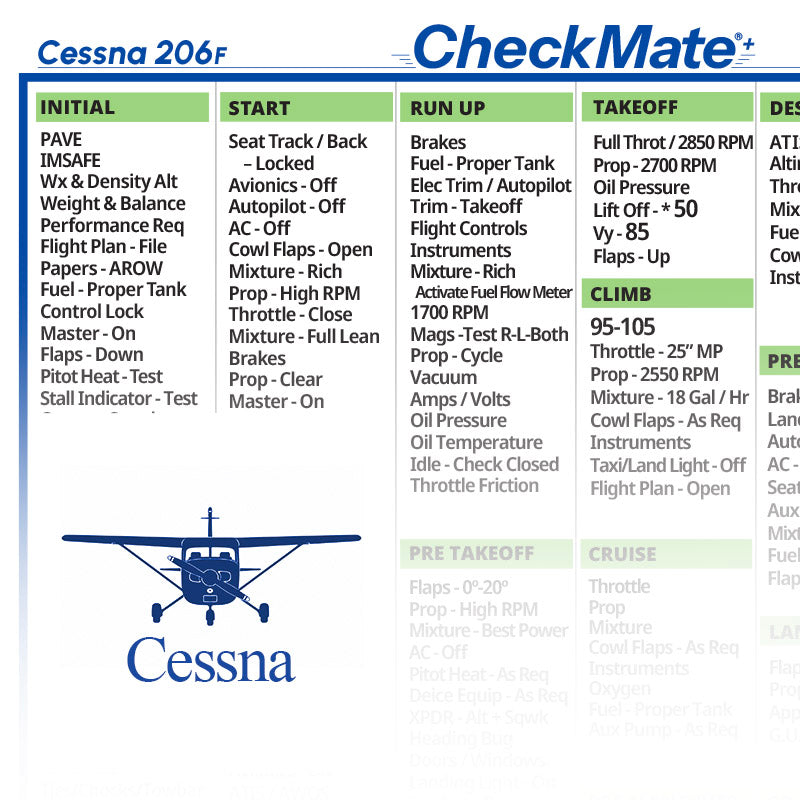
Quick answer: The CheckMate Cessna 206 F Checklist is a cockpit checklist for pilots who fly the Cessna 206 F Stationair, Cessna’s six-seat high-wing utility airplane. It comes as CheckMate, CheckMate+ or CheckMate Pro in Standard (6.5″ x 9″) or Compact (5″ x 7″) sizes, plus a QuickMate card. It’s meant to supplement the airplane’s POH/AFM, not replace it, so confirm it matches your exact model, year, engine and handbook before relying on it. It’s available on Skyfarer and at Skyfarer Shop.

CheckMate formats for the 206 F
- CheckMate. The design that started it all, with the familiar legacy look, in Standard (6.5″ x 9″) or Compact (5″ x 7″).
- CheckMate+. An updated design aimed at better readability and safety, with passenger and crew briefing prompts, abort plan prompts and ATC communications prompts. It includes an instant low-resolution, black-and-white temporary digital download, so you have a copy to use right away. Standard (6.5″ x 9″) or Compact (5″ x 7″).
- CheckMate Pro. A personalized CheckMate+: add your tail number, name or phone number, your empty weight and useful load, and details for up to five airports you visit often. Typical production time is within 48 hours. Standard (6.5″ x 9″) or Compact (5″ x 7″).
- QuickMate. A 5″ x 7″ plastic card with an abbreviated checklist for pilots who prefer minimalism. It highlights only the most critical information while keeping all the V-speeds and emergency procedures from CheckMate.
How to put it to work
- Confirm the match first. Compare the model, year and engine on the listing with your airplane’s POH/AFM, data plate and records before you fly with it.
- Read it against the handbook once. Go through it page by page with the POH/AFM and any supplements open beside it. Where they differ, the POH/AFM and supplements govern.
- Read it every cycle. In repetitive flying, read the checklist each time rather than once a day. Fuel state and loading change from flight to flight even when the routine doesn’t.
- Pick the size for your cockpit. Standard (6.5″ x 9″) gives more room on the page; Compact (5″ x 7″) is the smaller option when space on a kneeboard or in a side pocket is tight.
Good to know
A CheckMate 206 F checklist supplements the aircraft’s POH/AFM; it doesn’t replace it. The handbook, its supplements and the placards in your airplane are the authority on every procedure, speed and limitation, and the checklist is the working copy you fly with.
Airplanes with the same name can differ by model year, engine and installed equipment, so confirm the checklist matches your airplane’s exact model, year, engine and handbook before you rely on it.
Pilot tip: Repetition is when pilots stop reading and start reciting. If a checklist starts to feel automatic, that’s the moment to slow down and touch each item.
More photos


Where to buy
CheckMate Cessna 206 F Checklist is sold by Skyfarer Shop. Find it on the Skyfarer marketplace or order directly from Skyfarer Shop. Either link shows the current price, shipping options and return terms.
Frequently asked questions
Which size works best for busy, repetitive flying?
That’s a personal choice. Standard is 6.5″ x 9″ and Compact is 5″ x 7″; QuickMate, a 5″ x 7″ plastic card with an abbreviated checklist, is also listed for the 206 F.
Does this checklist replace the POH/AFM?
No. It supplements the airplane’s POH/AFM. The handbook and its supplements govern every procedure, speed and limitation, so confirm the checklist against them before you rely on it.
What does CheckMate Pro add?
CheckMate Pro is a personalized CheckMate+. You can add your tail number, name or phone number, your empty weight and useful load, and details for up to five airports you visit often. Typical production time is within 48 hours.
What is the temporary digital download?
CheckMate+ includes an instant low-resolution, black-and-white temporary digital download, so you have something to use while the printed checklist is on its way.