A flight review in your own airplane has a way of exposing habits. The instructor asks what you’d do with a partial power loss after takeoff, and you realize you’ve been leaning on the Garmin screens and the autopilot more than on the procedures you trained on.
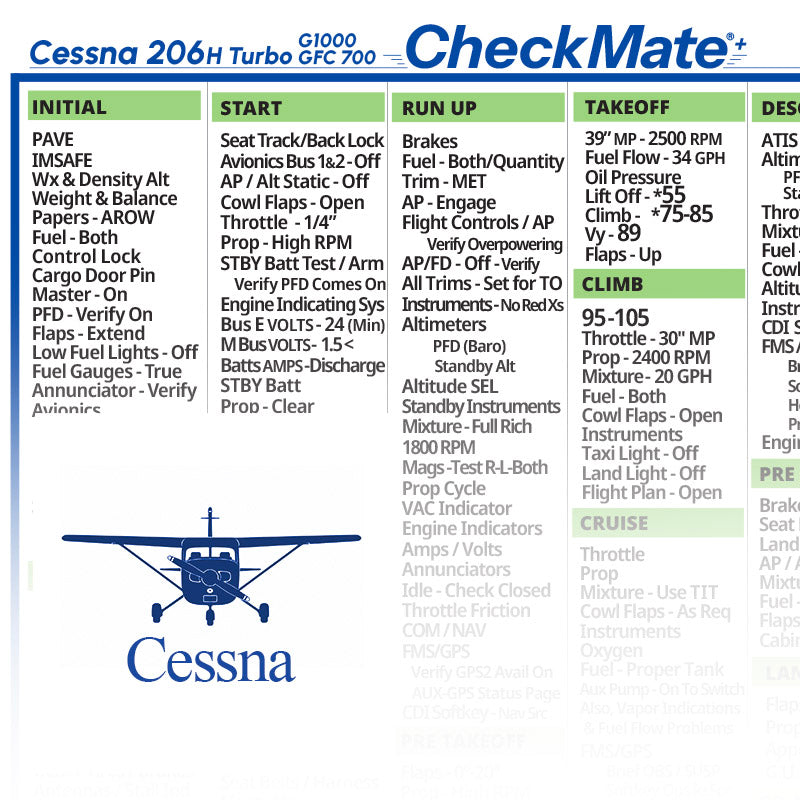
A checklist written for the Turbo 206 H with G1000 and the GFC 700 is a good study aid for exactly that conversation. Go through it alongside the POH/AFM’s emergency section before the review, and you’ll have a fresh picture of both. The POH/AFM and its supplements remain the source of truth; the checklist is the quick-reference copy you fly with.
Quick answer: The CheckMate Cessna 206 H Turbo G1000 GFC700 Checklist is a cockpit checklist for pilots who fly the turbocharged Cessna 206 H with G1000 and the GFC 700 autopilot. It comes as CheckMate, CheckMate+ or CheckMate Pro in Standard (6.5″ x 9″) or Compact (5″ x 7″) sizes. It’s meant to supplement the airplane’s POH/AFM, not replace it, so confirm it matches your exact model, year, engine and handbook before relying on it. It’s listed on Skyfarer and available at Skyfarer Shop.

The Turbo 206 H G1000 GFC 700 checklist, format by format
- CheckMate. The design that started it all, with the familiar legacy look, in Standard (6.5″ x 9″) or Compact (5″ x 7″).
- CheckMate+. An updated design aimed at better readability and safety, with passenger and crew briefing prompts, abort plan prompts and ATC communications prompts. It includes an instant low-resolution, black-and-white temporary digital download, so you have a copy to use right away. Standard (6.5″ x 9″) or Compact (5″ x 7″).
- CheckMate Pro. A personalized CheckMate+: add your tail number, name or phone number, your empty weight and useful load, and details for up to five airports you visit often. Typical production time is within 48 hours. Standard (6.5″ x 9″) or Compact (5″ x 7″).
Getting the most from it
- Start with a match check. Confirm the checklist fits your exact model, year and engine by comparing it with the airplane’s POH/AFM.
- Compare it with the POH/AFM before the first flight. Supplements for avionics, autopilots and other modifications can change procedures, so read those too. The handbook always governs.
- Review emergencies before the flight review. Read the checklist’s emergency procedures side by side with the POH/AFM’s emergency section a few days before, and talk through each one out loud.
- Keep it where your hand finds it. Decide where the checklist lives in flight and keep it there every time. Standard (6.5″ x 9″) and Compact (5″ x 7″) sizes give you a choice.
Checklist and handbook
Any checklist, including this one, works alongside the airplane’s POH/AFM rather than in place of it. The handbook and its supplements have the final word on procedures, speeds and limitations.
Before you rely on it, confirm it matches your airplane’s exact model, year and engine, and check it against the handbook that belongs to that airplane, including any supplements for modifications or avionics.
Pilot tip: Ask your instructor to include at least one scenario where the autopilot or avionics misbehave. Knowing how to fly the airplane without them is part of flying it with them.
More photos


Where to buy
CheckMate Cessna 206 H Turbo G1000 GFC700 Checklist is sold by Skyfarer Shop. Find it on the Skyfarer marketplace or order directly from Skyfarer Shop. Either link shows the current price, shipping options and return terms.
Frequently asked questions
Where do the emergency procedures I should know come from?
From the airplane’s POH/AFM and its supplements, which govern. Use the checklist as the quick-reference copy and confirm every item against the handbook.
Does this checklist replace the POH/AFM?
No. It supplements the airplane’s POH/AFM. The handbook and its supplements govern every procedure, speed and limitation, so confirm the checklist against them before you rely on it.
What does CheckMate Pro add?
CheckMate Pro is a personalized CheckMate+. You can add your tail number, name or phone number, your empty weight and useful load, and details for up to five airports you visit often. Typical production time is within 48 hours.
What is the temporary digital download?
CheckMate+ includes an instant low-resolution, black-and-white temporary digital download, so you have something to use while the printed checklist is on its way.