The first thing a pilot notices walking up to a Cardinal is what’s missing: wing struts. The 177’s cantilever wing gives it a clean look and a good view from the cabin, and its all-moving horizontal tail, a stabilator, sets it apart from the 172s parked nearby.
A different design means a different walk-around. Pilots who learned on 172s will find some preflight items familiar and others not, and the 177’s own handbook is where the differences are spelled out.
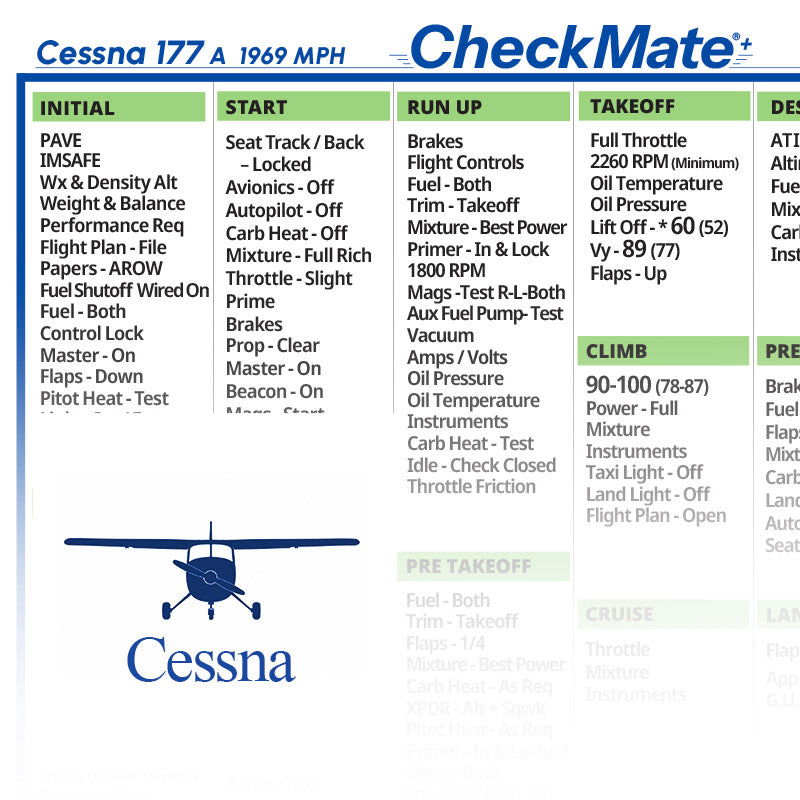
CheckMate lists a checklist for the original 177, separate from the 177 A, 177 B and 177 RG, so you can match the reference to the exact Cardinal you fly.
Quick answer: CheckMate Cessna 177 Checklist is a model-specific cockpit checklist for pilots who fly the Cessna 177 Cardinal. It suits owners and renters of the original 177, and pilots checking out in one for the first time. It’s offered as the original CheckMate, CheckMate+ and the personalized CheckMate Pro, with the CheckMate versions in Standard and Compact sizes. It supplements, not replaces, the airplane’s POH/AFM, so confirm it matches your aircraft’s exact model, year, engine and handbook before relying on it. It’s available on Skyfarer and at Skyfarer Shop.

Formats at a glance
- CheckMate. The design that started it all, with the familiar legacy look, in Standard (6.5″ x 9″) or Compact (5″ x 7″) size.
- CheckMate+. Updated design language for better readability and safety, with passenger and crew briefing prompts, abort plan prompts and ATC communications prompts. It includes an instant low-res, black-and-white temporary digital download, and comes in Standard (6.5″ x 9″) or Compact (5″ x 7″) size.
- CheckMate Pro. A personalized version of CheckMate+. Add your tail number, name or phone number, your empty weight and useful load, and details for up to five airports you visit often. Typical production time is within 48 hours; Standard (6.5″ x 9″) or Compact (5″ x 7″) size.
How to use it alongside your POH
- Check it against the handbook first. Before your first flight with it, go item by item against the POH/AFM. The checklist supplements the handbook; it doesn’t replace it.
- Account for later changes. Model, year and engine are the starting point; equipment added later comes with its own supplements, so check those too.
- Do a slow first walk-around. On your first flights, walk around with the checklist in hand and the POH nearby, and note what differs from the airplanes you know.
- Keep it within reach. Clip it to a kneeboard or keep it in a side pocket you can reach with your belts fastened.
Pilot tip: The stabilator feels different from a conventional elevator, especially in the flare. Fly with an instructor who knows the Cardinal before you carry passengers.
More photos


Where to buy
CheckMate Cessna 177 Checklist is sold by Skyfarer Shop. Find it on the Skyfarer marketplace or order directly from Skyfarer Shop. Either link shows the current price, shipping options and return terms.
Frequently asked questions
Which Cardinal models have their own checklists?
CheckMate lists separate checklists for the 177, 177 A, 177 B and 177 RG. Pick the one that matches your airplane’s model.
Can I fly with this instead of the POH?
No. Keep the POH/AFM and required documents in the airplane as usual. The checklist is a cockpit companion that supplements the handbook; check it against your aircraft’s model, year, engine and POH before use.
What does CheckMate+ add over the original?
Updated design language for readability and safety, plus passenger and crew briefing prompts, abort plan prompts and ATC communications prompts. It also includes an instant low-res, black-and-white temporary digital download.