Quick answer: The Logitech G X56 is a HOTAS — hands on throttle and stick — made of a separate joystick and a twin-lever throttle. It suits a home flight simulator well if the aircraft you fly, or want to fly, has a stick: a Cub, a Citabria, a Decathlon, a Diamond, most homebuilts, warbirds and aerobatic types. If you are training in a Cessna 172 or a Piper, a yoke will feel closer to the real thing, and that difference matters more than any feature list.
See the Logitech G X56 H.O.T.A.S. on Amazon
What the X56 Actually Is
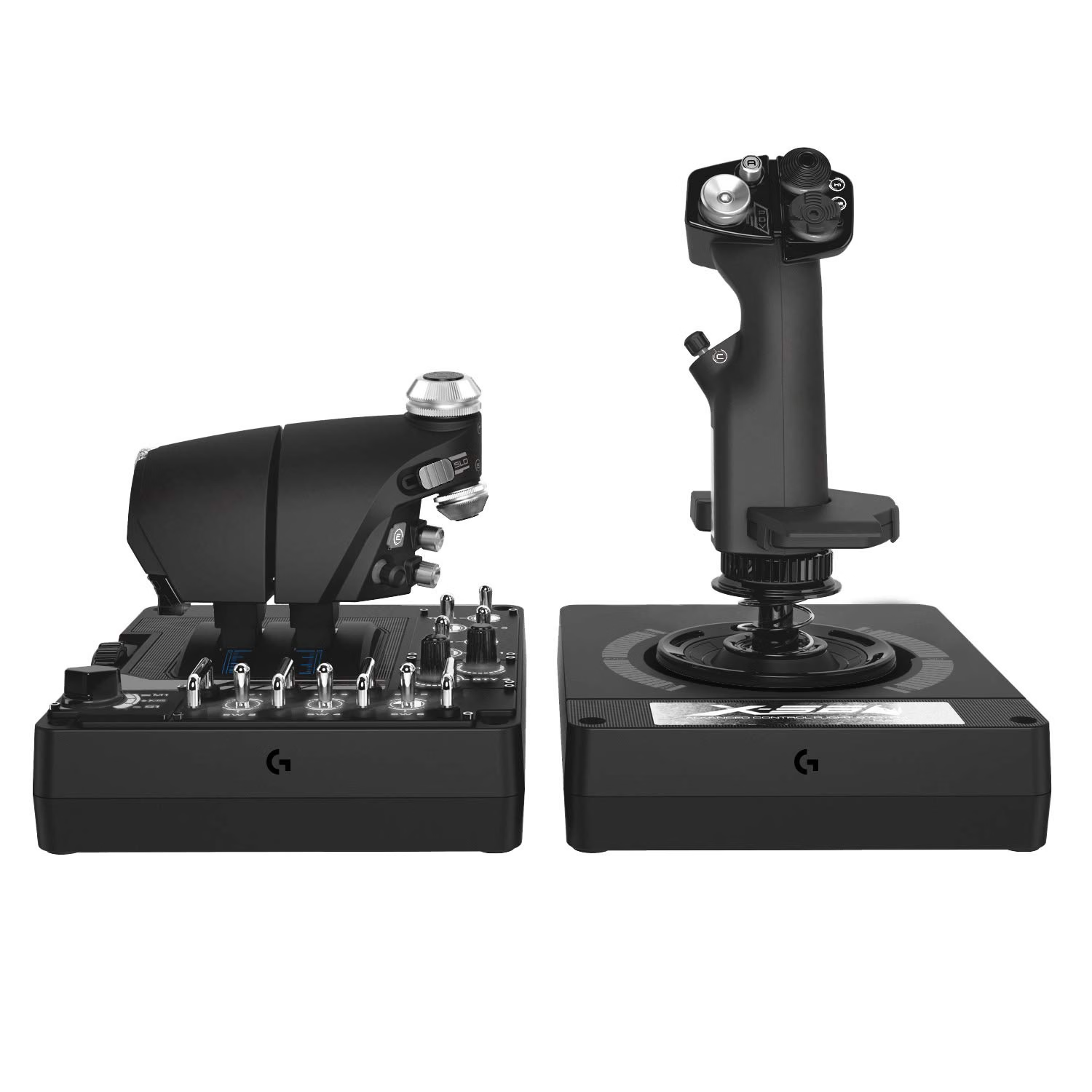
Two units, connected to the computer separately over USB. The joystick carries the pitch, roll and — by twisting the grip — yaw inputs, along with a cluster of buttons and hat switches. The throttle is a pair of levers that can be moved together or split, plus its own set of switches and a small analogue thumbstick.
The points that matter for a sim pilot:
- Hall-effect sensors on the stick’s pitch and roll axes, at 16-bit resolution. Hall-effect sensors measure position magnetically rather than by wiping contact, so they do not wear and drift the way cheaper potentiometer sticks can.
- Adjustable stick force through a four-spring system, so you can make the stick heavier or lighter to suit the aircraft you are simulating.
- Twin throttles with a friction adjuster and a throttle lock — useful for twin-engine aircraft, and the friction control is a small but genuinely realistic touch.
- A large number of programmable controls, which you can assign to flaps, trim, gear, lights and view controls in your simulator.
- Windows PC only, with two free USB ports needed; a two-metre cable.
Who It Suits — and Who It Does Not
| You fly… | X56 fit | Why |
|---|---|---|
| Stick aircraft — Cub, Citabria, Decathlon, Diamond, RV | Strong | The control you hold matches the control in the aeroplane |
| Warbirds, aerobatics, military jets | Strong | This is what a HOTAS is designed around |
| Twins | Good | Split throttles map naturally to two engines |
| Cessna 172, Piper Warrior and similar | Weaker | A yoke transfers better to a yoke aeroplane |
| Instrument practice | Adequate | The inputs work; the realism of the control is not the point of IFR practice |
That fourth row is the honest caveat. The value of a home simulator for a student pilot comes from rehearsing procedures and flows, not from the joystick. But if your real aircraft has a yoke, a stick adds one more thing that is different from the cockpit you are training in. We cover the wider case for simulator time in why general aviation undervalues simulator training.
Where the X56 shines is for the pilot who flies stick aircraft, or who wants a single controller that covers GA, warbirds and the occasional fast jet without swapping hardware.
Setting It Up in a Home Sim
1. Give it a solid mount
Both units are big, and a stick that slides across the desk every time you pull back is worse than useless. Clamp or weight them down, or use a dedicated stand. Put the stick where your right hand naturally falls and the throttle to your left, the way a stick aircraft’s cockpit is laid out.
2. Install the software and set the springs
Logitech’s software handles button programming and the lighting. Choose a spring weight that suits the aircraft: a light aerobatic type wants a lighter stick than a warbird.
3. Calibrate, then set dead zones sparingly
Calibrate both units inside the simulator. Keep the dead zone around centre as small as the hardware allows. A large dead zone teaches you to make coarse inputs, which is exactly the wrong habit to carry into a real aeroplane.
4. Keep response curves close to linear
It is tempting to soften the stick with a heavy curve so the aircraft feels calmer. Resist most of it. A near-linear response keeps the relationship between how far you move the stick and what the aircraft does honest, which is the whole point.
5. Map the controls you actually use
Start with the essentials — flaps, trim, gear if you fly retractables, and a view control — and resist programming all of them on day one. A short, consistent layout builds muscle memory; a crowded one just builds confusion.
What It Will Not Do
- It will not replace a proper throttle quadrant if you want separate mixture and propeller levers for complex-aircraft practice. You can map those functions to spare controls, but it is not the same as a lever in the right place.
- It will not make a yoke aeroplane feel like a yoke aeroplane.
- It will not count toward any certificate. Home simulator time is for rehearsal, not logging.
- It will not fix technique on its own. A good controller rewards good practice; it does not supply it.
Is It Worth It?
For a pilot who flies stick aircraft, or wants one controller that covers a broad range of simulated flying, the X56 is a well-established choice with durable sensors and more adjustability than most HOTAS sets. For a student training in a yoke aeroplane, spend the money on a yoke first and treat a HOTAS as a second purchase.
Whichever you choose, the controller is the smallest part of the value. using a simulator for checkride preparation and flying real charts and approach plates at home cover what to actually do with it.
Buying Used, or Selling Your Old Setup
Sim hardware changes hands often — people upgrade, switch aircraft, or change simulators — which makes the used market worth checking before you buy new. Skyfarer’s pilot gear and aviation supplies marketplace lists new and used equipment from pilots, including flight simulation gear, headsets, flight bags and training materials.
It works the other way too. If a new controller replaces an old joystick, yoke or rudder pedals, you can list them on Skyfarer for free; buyers cover the shipping, and the gear goes to another pilot rather than into a cupboard.
Frequently Asked Questions
What is a HOTAS? Hands On Throttle And Stick — a flight controller made of a separate joystick and throttle, with switches on both so you can operate the aircraft without taking your hands off the controls. It originated in military aircraft.
Is the Logitech X56 good for general aviation flight simulation? It suits aircraft that have a stick, such as Piper Cubs, Citabrias, Diamonds and most homebuilts. For yoke aircraft like the Cessna 172, a yoke controller transfers better to the real cockpit.
Does the X56 work with Microsoft Flight Simulator and X-Plane? It is a standard Windows USB controller, and both simulators let you assign its axes and buttons. It is PC only and needs two free USB ports.
Can I use the X56 for twin-engine aircraft? Yes. The throttle has two levers that can be split, which maps naturally to two engines. Separate mixture and propeller levers are not included, though those functions can be assigned to spare controls.
Does home simulator time count toward a pilot certificate? No. Home simulators are for rehearsing procedures and flows. Only approved training devices used under the regulations, with an instructor where required, can be logged.
Affiliate disclosure: Skyfarer may earn a commission from qualifying purchases via our links. This funds our content for pilots. As an Amazon Associate we earn from qualifying purchases.